
Designing Gaming & E‑Sports Rooms – Tech, Comfort & Visual Impact
A great gaming room design balances performance, comfort and atmosphere. Ergonomic seating and desk layout, wired networking, surge protection, good ventilation and dramatic lighting all matter as much as the screen. Here is how to plan an esports-ready room that stays cool, organized and visually impressive.
Table of Contents
Key Takeaways:
- Hardware selection balances high-refresh displays, low-latency networking, adequate cooling, and tidy cable management to ensure consistent performance during competitive play.
- Ergonomic furniture and acoustic treatment reduce physical strain and audio distractions; use adjustable chairs, monitor arms, vibration-isolating desks, and targeted sound panels for comfort and clear communication.
- Lighting and visual design set mood and readability through layered ambient/task lighting, controllable accent RGB, calibrated color profiles, and cohesive wall or branding elements for strong visual impact.
Space Planning & Ergonomics
Plan your layout to leave clear traffic paths, balanced lighting, and distinct zones for play, streaming, and downtime. You should minimize glare, allow fast equipment access, and protect power and cooling to avoid overheating risks.
Layout strategies for solo play, streaming, and team competition
Configure desks and camera angles depending on whether you play solo, stream, or host a team. You should isolate sound sources, use flexible seating for team scrims, and keep audience-facing visuals clear-mic bleed and background clutter can wreck streams.
Ergonomic workstations: desks, seating, monitor arms, and sightlines
Choose height-adjustable desks, ergonomic chairs, and monitor arms so you maintain a neutral posture; poor setups cause neck and wrist strain. You should align eyes with the top third of screens and keep keyboard/mouse at elbow height for sustained comfort.
Adjust desk height so your elbows sit at 90-100°, keep monitors 50-70 cm away with the top third at eye level (monitor height). You should use a chair with adjustable lumbar support, set armrests just below elbow level, mount screens on arms for quick sightline tweaks, and route cables to remove trip hazards while preserving airflow to prevent heat buildup.
Audio & Acoustics
Balance low-latency signal chains and room control: aim for a system latency of <10 ms and DAC/interface rates of 48-96 kHz/24-bit to preserve localization. You’ll choose between precise open-back headsets for FPS positioning and studio monitors with isolation for streaming; place bass traps and first-reflection absorbers to target an RT60 near 0.25-0.4 s in the 100-500 Hz band. Proper setup delivers accurate imaging and reduced listening fatigue.
Sound system selection: headsets, speakers, mixers for clarity and immersion
Choose headsets with 40-53 mm drivers and wired USB/optical connections to keep latency <10 ms; open-back models (e.g., Sennheiser Game One) give superior positional cues for FPS, while closed-back or nearfield monitors (Yamaha HS5 or KRK Rokit paired with an 8″ sub) provide fuller streaming reproduction. Use a GoXLR or Focusrite interface for separate channel control and 48-96 kHz/24-bit capture to avoid distortion and preserve clarity during live mixes.
Room treatment: absorption, diffusion, and noise isolation for competitive play
Treat reflections and bass to sharpen in-game cues: target an RT60 of ~0.25-0.35 s across 125-4,000 Hz and keep ambient noise below ~35 dBA for focused play. You should place broadband absorbers at first-reflection points, 4-8″ corner bass traps for low-frequency buildup, and diffusers behind the player to retain natural high-frequency ambience. Seal doors and use double-glazed windows or heavy drapes to improve isolation-this yields precise positional cues and lower distraction.
Start by measuring room response with REW and a calibrated mic or pink-noise + SPL meter to locate peaks, then apply the mirror method to mark first reflections on side walls and ceiling. You’ll get better results using 4″ panels for mid/high absorption and 6-8″ or stacked corner traps for energy below ~120 Hz; treat dominant modal frequencies with tuned Helmholtz or membrane traps if narrow peaks persist. Space diffusers behind the listening position to avoid a dead-sounding room-over-absorption can destroy spatial cues, so balance absorption with diffusion.
Visual Systems & Displays
You’ll prioritize display choice by use-case: competitive play favors high refresh, content creation needs color accuracy, and spectator setups demand scale. For layout and aesthetic guidance consult Space to Play: Design Your Perfect Gaming Room. Balance resolution, viewing distance, and mounting options early to avoid costly rework; plan power, ventilation, and cable runs to support whichever display strategy you select.
Monitor types, multi‑screen setups, and projector/LED wall options
You should match panel type to priority: TN for sub-1ms speed, IPS for color and viewing angles, VA for deep contrast; curved and ultrawide panels boost immersion while multi‑monitor arrays improve workflow. Knowing ambient light, bezel tolerance, and GPU bandwidth constraints will determine whether a 32:9 ultrawide, stacked screens, projector, or modular LED wall is best for your room.
- Competitive: 240Hz 1080p, low input lag
- Streaming/Multitask: dual 1440p or 4K + 1440p
- Immersive: 3440×1440 ultrawide or curved 49″
- Projector: 4K DLP, control ambient light
- LED wall: modular panels, high brightness
| Panel | Best for speed, color, or contrast respectively |
| Resolution | 1080p for 240Hz, 1440p balance, 4K for visuals |
| Refresh | 120Hz+ for smoothness; 240Hz for esports |
| Projector | Large image, needs light control and throw space |
| LED wall | Seamless scale, high cost, modular maintenance |
Calibration, refresh rates, input lag, and spectator viewing considerations
You must calibrate for accurate color with a colorimeter, target 6500K white point and gamma 2.2 for typical workflows. Higher refresh rates like 144-240Hz reduce motion blur; aim for input lag <10ms for competitive play. For spectators, provide sightlines to a large secondary screen or LED wall and set display brightness to overcome ambient light without causing eye strain.
In practice, use DisplayCAL or a hardware calibrator to generate ICC profiles, and lock refresh rates via GPU drivers (DisplayPort for highest bandwidth). Measure end‑to‑end latency with tools like SMTT or an oscilloscope for pro setups; if you stream locally, route a low‑latency feed to the audience display. Pay attention to panel viewing angles and height so viewers outside the primary seat still see accurate color and contrast.
Lighting & Ambience
Lighting choices shape immersion: you should layer focused task lights, bias LEDs, and soft accents so gameplay stays immersive while minimizing eye strain and preserving contrast for fast reactions.
Task, bias, and dynamic RGB lighting for performance and mood
You can combine task lighting for clarity, subtle bias lighting to cut contrast, and adaptive RGB to signal in-game events or reset focus during breaks.
Glare control, blackout solutions, and programmable scene design
Control glare with angled fixtures, anti-reflective screens, and blackout solutions, then use programmable scenes so you can switch instantly between practice, competition, and rest modes.
Implement multi-layer glare control by fitting motorized shades with overlapping tracks, blackout liners, and window seals so you can block direct sun, add angled or recessed fixtures with low-glare diffusers and anti-reflective monitor coatings to reduce reflections, and tie programmable scenes to timers or game states to dim or restore lighting automatically-avoid excess blue light at night to prevent eye strain and sleep disruption.
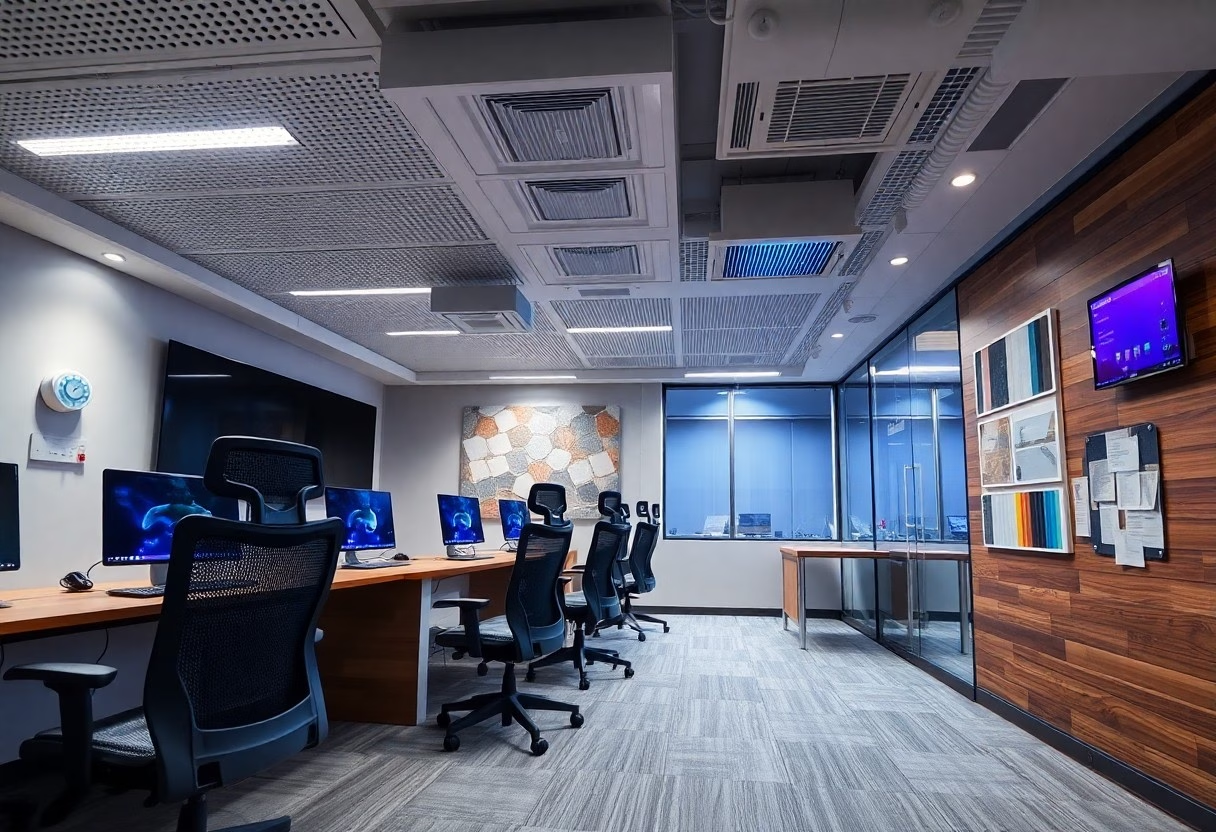
Comfort, HVAC & Materials
Climate control, ventilation, and thermal comfort for long sessions
Gaming rigs and multiple consoles can dump 300-800 W of heat per high‑end PC, so you should size HVAC for equipment plus occupants. Aim for 18-24°C (64-75°F) with 40-60% RH, target about 4-6 air changes per hour in medium rooms, and zone cooling with variable‑speed fans to avoid hot spots. Overheating will throttle GPUs and raise failure rates, so include dedicated return vents and regular filter changes to sustain performance during marathon sessions.
Durable finishes, flooring, and maintenance for high‑traffic environments
Specify commercial materials: luxury vinyl plank with a ≥0.5 mm wear layer, epoxy or rubber tiles for equipment zones, and carpet tiles (AC4/AC5 rated) in spectator areas for sound control and replaceability. Choose stain‑resistant textiles and wall panels with impact‑resistant backing; slip resistance of R10 or better helps safety. Cable channels and corner guards reduce wear and make cleaning straightforward.
For upkeep, establish a regimen: vacuum and wipe high‑touch surfaces daily during events, pH‑neutral mop weekly, and deep‑clean or replace carpet tiles every 5-7 years in heavy use areas. Clean PC internals with compressed air quarterly, swap HVAC filters every 1-3 months, and plan flooring replacement on a 10-15 year lifecycle for vinyl or 7-10 years for heavy epoxy zones to keep appearance and performance optimal.
Networking, Power & Cable Management
Wiring your setup for gaming balances tech, comfort and look; plan trunking, clean cable routing and concealed power to reduce trip hazards, and consult Perfect E-Sports Gaming Room – SBD International for layout examples.
Low‑latency networking, bandwidth planning, and redundancy
Latency demands you prioritize wired gigabit links, QoS settings and low-latency routing; plan bandwidth per player and simple redundancy like dual ISPs or failover to prevent match-impacting lag.
Power distribution, surge protection, UPS, and clean cable routing
Power distribution forces you to install dedicated circuits, surge protection, and UPS units to guard equipment and keep play running during outages while you route cables for safety.
Protecting your gear means assigning dedicated circuits for high-draw systems, spreading consoles, PCs and chargers across breakers to avoid overload; never daisy-chain strips and keep power-hungry devices on separate feeds to reduce fire risk. You should pair a high-joule surge protector with a properly sized UPS for routers and rigs, label circuits, and route cables in trays to maintain airflow and serviceability.
Summing up
Now you can design a gaming and e‑sports room that balances cutting‑edge tech, ergonomic comfort, and striking visual impact by prioritizing performance hardware, optimized acoustics and lighting, proper seating and desk ergonomics, efficient cable management and ventilation, and a layout that supports focus and streaming needs. Personalize finishes and RGB subtly to reinforce your brand or mood while keeping accessibility and long‑term comfort in mind.
FAQ
Q: How do I spec and arrange the core tech for a high-performance gaming and e-sports room that also streams?
A: Start with a target use-case (competitive play, content creation, or both). For competitive play prioritize a high-refresh, low-latency monitor (240Hz+ for pro play or 144Hz+ for most gamers) with DisplayPort support, a CPU/GPU balance that maintains frame rates at your chosen resolution, 16-32GB DDR4/DDR5 RAM, NVMe SSD for OS/games, and a quality power supply with headroom. For streaming decide between a single powerful PC (with NVENC/AMD encoder) or a dual-PC setup with a capture card; USB/analog microphones benefit from dedicated audio interfaces or mixers for cleaner gain and routing.
Use wired Gigabit Ethernet with managed switches or QoS on the router to prioritize gaming traffic; keep Wi‑Fi for guest devices only. Plan ports and cables: label, use Velcro/ducting, and keep a service loop for each device.
Cooling and noise matter: optimize airflow with intake/exhaust balance, choose quiet fans or an AIO and acoustically isolate noisy components. Add a UPS or quality surge protector and mount power distribution near gear to avoid long extension runs. Finally, choose peripherals (mechanical keyboard, low-DPI-tested mouse, high-quality headset or studio monitors) that match play style and comfort preferences.
Q: What ergonomic and comfort features should I implement for long practice sessions and tournaments?
A: Prioritize an adjustable setup: an ergonomic chair with height, lumbar, and armrest adjustments; a desk at elbow-height or a height-adjustable sit‑stand desk; and monitor(s) mounted so the top third of the screen is at eye level and the center sits roughly an arm’s length away. Use a full‑size mouse pad for low-DPI play, position the mouse and keyboard so wrists stay neutral, and add a wrist rest if needed. Implement anti-fatigue mats for standing use and a footrest for seated sessions. Control ambient temperature and ventilation-players perform worse in overheated or humid rooms.
Install layered lighting: diffuse overhead for general comfort, task lighting for peripherals, and bias lighting behind monitors to reduce eye strain. Schedule lighting scenes to support different activities (training, scrims, streaming). Acoustic treatment that reduces reflections (first‑reflection panels, ceiling clouds, bass traps) increases perceived comfort and communication clarity without making the room dead; pair treatments with soft furnishings and rugs to manage reverberation.
Q: How can I design visual impact and broadcast-ready backgrounds without sacrificing functionality or acoustics?
A: Build a composed scene using three layers: background, midground, and foreground. Backgrounds should be tidy and branded-shelving with trophies, subtle murals, or fabric panels-avoiding glossy surfaces that reflect lights. For live broadcasts use either a well-lit physical backdrop or a chroma key (green) wall with even, shadow-free lighting and sufficient distance between talent and backdrop.
Implement programmable accent lighting (addressable LED strips, RGB fixtures) to create team colors and scene transitions, but keep intensity controlled to prevent spill on skin or cameras. Frame the camera at eye level or slightly above, use the rule of thirds, and maintain consistent key/fill/back lighting to avoid harsh shadows; a soft key light and a dimmer fill maintain depth.
For audio-first impact add acoustic panels integrated into the design (color-matched or printed) and bass traps in corners to keep low-end tight for stream audio. Conceal cables with trunking and grommets and use quick-release mounts for peripherals so the space can switch between tournament rigs and streaming setups quickly.
Lay out desks, screens and lighting in the free 3D room designer before buying equipment.